PDFSolution brief
Date not verifiedQStar and DISC Long-Term Archiving Solution Brief
Long-term optical and archive design combining QStar software with DISC systems.
- Vendor:
- QStar / DISC
- Date:
- Date not verified
- Format:
- Size:
- 2.0 MB
Immutability in the material
Optical archive libraries suit moderate volumes held under long mandated retention, where the evidential argument matters more than throughput. They suit very little else.
Aban Smart designs, supplies, integrates and supports DISC optical libraries and QStar archive software for records environments across the GCC.
Auditors tend to ask one blunt question about a records archive: what would a person have to do to change this? For most storage the honest answer runs through a chain of software controls, each with an administrator somewhere who can amend it. For a burnt BD-R disc the answer is that the recording layer has already been physically altered, and no command reverses that. This is a narrow advantage, and it comes with real costs in capacity and retrieval time, but it is the reason optical keeps appearing in records rooms long after it left datacentre roadmaps.
Non-rewritability sits in the medium, not in a setting.
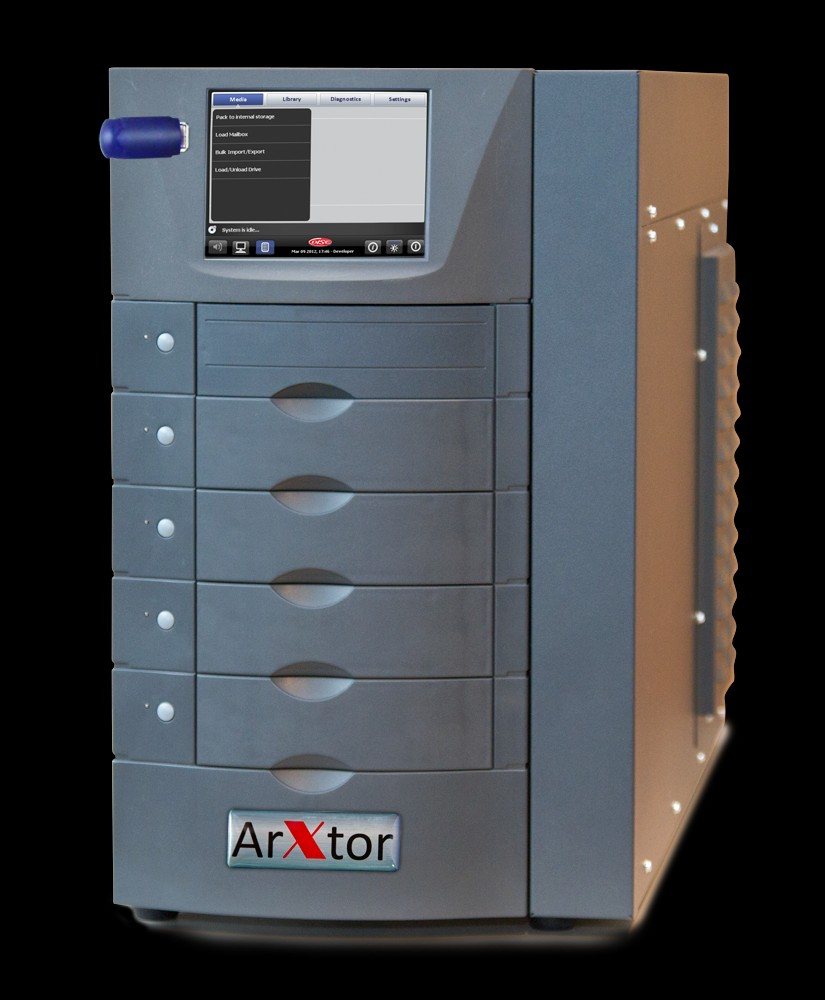
An optical archive library is four things in one cabinet. Discs sit in removable magazines. A robotic picker moves them. A bank of Blu-ray drives reads and writes them. A front-end server with a disk cache presents the whole thing to the network as a file share or an S3 endpoint, usually through QStar Archive Manager.
The removable magazine is the part that distinguishes optical from most other library formats. On the DISC ArXtor series these are called SmartPacks, documented as holding fifteen discs each, and they lift out of the cabinet as a unit. That turns "export to shelf" from a per-disc chore into a single physical action, and the offline tier then grows against shelf space rather than against anything inside the cabinet.
Published DISC documentation describes three cabinet sizes with slot counts ranging from tens to several hundred, one to ten drives, and average media exchange times of a few seconds. Treat those figures as indicative of the product family rather than as a current specification, for reasons set out further down this page.
The cache in front of the library does more work than people expect. Recently written and recently read files stay on disk, so most reads never reach the robotics at all. Sizing that cache against the actual recall pattern is usually the single largest determinant of whether users find the archive tolerable.
Every other immutability mechanism in common use is a rule that something enforces. An appliance refuses the delete. An object store refuses the delete. A retention policy in archive software refuses the delete. Each of those is trustworthy in proportion to how hard it is to compromise the thing doing the refusing, which is why the WORM and immutability comparison treats governance-mode locks and hardware WORM as different categories of protection rather than degrees of the same one.
Write-once optical media removes the enforcer from the picture for data already written. There is no configuration flag to flip, no firmware setting, no privileged account with a bypass permission, and no vendor escrow process. A BD-R disc that has been burnt is a disc that has been burnt.
Auditors and legal reviewers find this easy to reason about, and that is a practical benefit rather than a technical one. Explaining that a retention lock cannot be lifted requires walking someone through firmware behaviour, administrator roles and management-plane security. Explaining that a disc cannot be rewritten takes one sentence.
Three honest limits belong alongside that argument:
Manufacturer material for Blu-ray archival media cites lifespans of fifty years and above, and INCOM makes a comparable fifty-year claim for the CD-R and DVD-R media it supplies for medical use. Those are the manufacturers' own figures, derived from accelerated ageing tests conducted under controlled conditions, and we have not independently tested them. They are a statement about the media chemistry, not a warranty on your storeroom.
What they depend on is unglamorous. Stable temperature and humidity, no direct light, discs stored vertically in their magazines, no adhesive labels applied to the data surface, and handling by people who have been told why any of that matters. A GCC facility with a storeroom that loses cooling over a long weekend is testing the media in conditions the laboratory did not simulate.
Longevity also means nothing without periodic verification. A read-back schedule on a sample of the oldest media, with checksums compared against the values recorded at ingest, is what converts a lifespan claim into evidence. QStar Archive Manager tracks media identity and location including for media that has left the library, which is what makes an offline tier auditable rather than merely absent.
Offline handling is a set of duties, and each needs an owner:
| Duty | What it means in practice | What breaks without it |
|---|---|---|
| Export and cataloguing | Magazine removed, logged against the archive index | Media exists but nobody knows what is on it |
| Storage conditions | Controlled environment, monitored, separate from the library | Lifespan claims stop applying |
| Custody and access log | Named custodian, recorded handovers | No chain of custody to present |
| Retrieval procedure | Documented route from request to mounted disc | Recall time becomes unbounded |
| Periodic read-back | Sampled verification against ingest checksums | Degradation found only when the data is needed |
Retrieval time is the operational consequence. Media on a shelf is not nearline storage. A request that requires someone to fetch and load a magazine is measured in hours, sometimes in a working day if the media is held offsite. That is acceptable for records nobody reads and unacceptable for anything an operational workflow waits on. Deciding which category your data falls into is a records question before it is a storage one.
This is where even-handedness matters. The Blu-ray formats used in archive libraries run from 25 GB on single-layer BD-R up to 100 GB and 128 GB on BD-XL. A current LTO cartridge holds tens of terabytes uncompressed. That gap is roughly two orders of magnitude per piece of media, and no amount of enthusiasm for optical closes it.
The practical effect is that a fully populated optical library reaches a total capacity that a single tape frame exceeds comfortably. Growth in an optical archive is absorbed by adding magazines and eventually cabinets, and each disc is a separate object to write, verify, catalogue and eventually re-read.
So the honest positioning is narrow. Optical is worth considering when annual ingest is moderate, retention is long and externally mandated, and the evidential character of the medium is something you would have to argue in front of a regulator or a court. Where volumes run to hundreds of terabytes or beyond, LTO tape libraries are the correct instrument and optical is an expensive way to reach the same place.
Mixed designs are common and sensible. A small optical tier holding the legally significant subset, alongside a much larger tape or object tier holding everything else, gives you the evidential copy without paying optical economics on bulk data.
Say this plainly, because the industry usually does not.
Optical performs poorly with high sustained ingest. Write speeds per drive are modest, and adding drives adds cost quickly. If daily ingest is large, the library becomes a bottleneck rather than a destination.
It performs poorly with frequent recall of scattered files. Every miss in the disk cache costs a robotic exchange and a disc spin-up. A workload that reads unpredictably across the whole archive will keep the picker busy and the users unhappy.
It performs poorly at very large scale, for the capacity reasons above. And it is not a backup system: there is no incremental scheduling, no application-consistent snapshot, no rapid bulk restore.
Where it does fit is a specific profile. Healthcare imaging archives with statutory retention, government records with permanent or multi-decade schedules, and evidential material where the storage medium itself forms part of the argument. The healthcare and medical imaging page covers the DICOM side of that in more detail, including patient media production at the point of collection. INCOM also distributes third-party disc and USB publishing systems for that job. Those are other companies' products rather than part of the three-manufacturer stack described here, and any write-protection they apply is enforced by the device rather than by a recording layer, so we specify them on their own terms.
Be direct about this. Much of the available DISC product documentation is legacy. Model names, slot counts, drive counts and per-disc capacities in circulating datasheets reflect an earlier generation, and at least one published table is internally inconsistent about media capacity. Nothing on this page should be treated as a current specification.
Aban Smart confirms current models, supported media types, per-cartridge capacity, drive counts and lead times with the manufacturer before quoting. If a figure cannot be confirmed, we say so rather than repeating a datasheet.
There is one manufacturer reference worth knowing about: a QStar and DISC deployment at Nottingham City Transport for onboard video retention. That is the manufacturers' published customer story, not an Aban Smart project, and we describe it that way.
The other technologies in the portfolio are listed on the technologies overview, and the manufacturers we work with are set out on the partners page. For a configuration priced against your actual retention schedule and recall expectations, request configuration and pricing.
Manufacturer documentation relevant to this page. Availability, specifications, and configurations are subject to verification.
Long-term optical and archive design combining QStar software with DISC systems.
Optical media publishing system flyer for medical imaging distribution.
German-language brochure on medical archive media. Provided for reference; English confirmation recommended.
Not through any software or administrative route. The recording layer of BD-R and comparable write-once media is physically altered during writing, so there is no overwrite operation to invoke. The disc can be physically destroyed, which is why custody and access control over exported media matter as much as the technology. Anything still held in the library's disk cache has not yet gained that property.
Share the workload, capacity, retention, access, and resilience requirements. Aban Smart will identify the next discovery inputs and the appropriate engagement path.